 Hush
HushHush — start with something yours
Private photos. Hidden chats. One keypad.
Keep your own photos and videos in private spaces, or open a conversation with its own six-digit code. Start on your own; invite someone when you need to.


Free to start · Optional Plus
Private Spaces on iPhone. For Android, check current features in Google Play and the app.
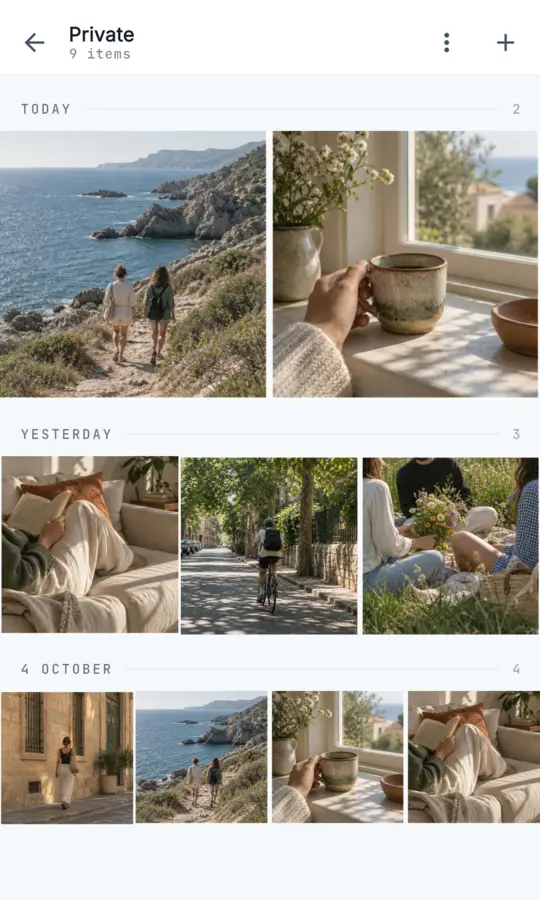
iPhone fixture with sample content.
Open it. Close it. Find it again.
Your space opens from the keypad with its own six-digit code. Leaving it returns you to the keypad.
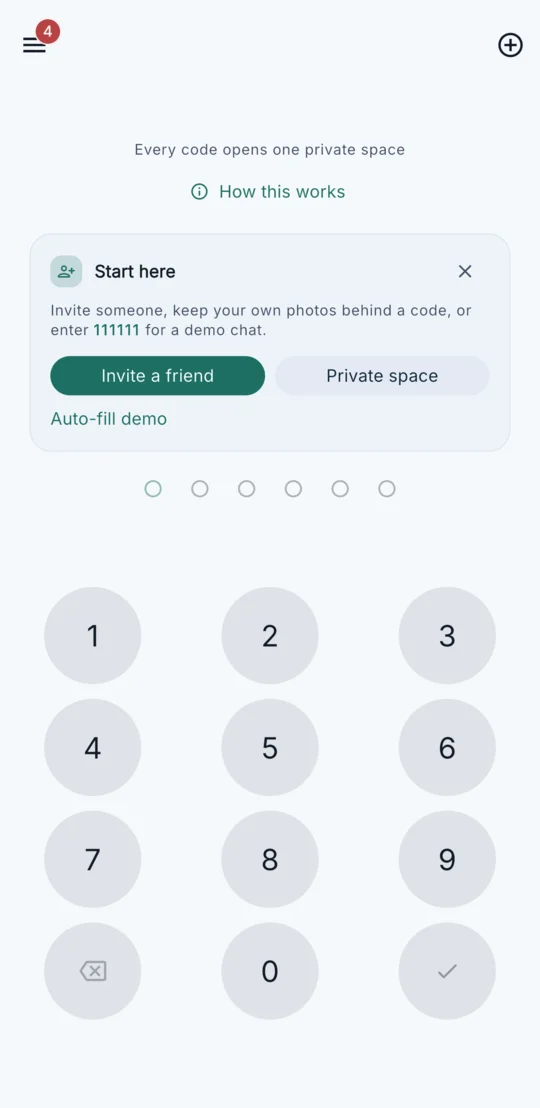
Actual iPhone app screens with bundled sample content. The open and reopened frames use the same fixture capture.
See the full Private Spaces walkthrough →Start on your own. Connect when you want to.
For you
Private Spaces
Save your own supported photos and videos behind a space’s six-digit code. No second person is needed. Private Spaces are available on iPhone.
Explore Private Spaces →For a conversation
Hidden messaging
Send a username request that the other person approves, or share a one-tap invite link from Hush. Each person has their own six-digit code for the chat. Hush chats happen inside Hush.
 Try the built-in chat demo →
Your first useful action, in a few steps.
Download Hush, create an account and choose a username. The current default signup needs no phone number or email.
- Create a Private Space on iPhone.Choose its own six-digit code and keep it safe.
- Add a photo or video.Choose supported media within your current allowances. Importing leaves the original in Photos.
- Close and reopen it.Return to the keypad, then enter that space’s code again.
Explore a chat before connecting.
After account setup, enter 111111 on the keypad to open the built-in Echo Bot demo. To chat with someone else, both people install Hush and connect by username request or invite link.
Start free. Choose Plus when you need more.
Core keypad access and notification choices are free. Plus adds room and flexibility.
Free
- Personal Private Spaces on iPhone, with limited space, item and supported-file allowances.
- Messaging with a limited photo/video sharing allowance and available expiry settings.
- Separate codes and free show-name, hide-name or mute controls.
Plus
- More of your own spaces and saved items, with larger supported space files.
- Eligible chats gain higher sharing allowances, longer expiry options and custom contact names.
Your subscription applies to your own storage. Either person’s Plus can extend eligible benefits to that conversation.
See current prices in the app.
Check available plans and trial eligibility at checkout. Subscriptions renew unless cancelled through the store used to purchase.
Compare Free and Plus →Know what a code protects.
A keypad controls access through Hush. Understand the storage and recovery limits before adding something important.
Code-based access, with backend storage
Hush is not end-to-end encrypted. Backend services store content and access data; codes are not encryption keys. Requests, alerts, notifications and device or store records can reveal activity.
Keep your codes and account access safe
There is no in-app forgotten-code recovery or master unlock. Forgetting a code does not erase stored content. Do not rely on reinstalling or changing devices to restore a default-signup account.
Copies and retention matter
Importing leaves originals in Photos, and media can retain embedded metadata. Space items do not use the chat expiry timer; Hush is not a backup or permanent-storage guarantee. Expired chats are cleaned up later, and saved copies can remain.
A few things to know before you start.
Can I use Hush without inviting anyone?
Yes. Private Spaces on iPhone hold your own photos and videos behind a six-digit code. No second person is needed. Create a space, add a supported photo or video, then return to the keypad and enter its code to open it again. Explore Private Spaces →
Which features are available on my phone?
Private Spaces are advertised for iPhone. Hush is also available on Google Play, but this website has not verified Android release parity for newer features. Check device compatibility and current features in your store and app. Android guide →
Is Hush free, and when does Plus help?
Start free with limited storage and sharing allowances. Plus adds more personal spaces and saved items, larger supported space files, and eligible chat benefits. Your own Plus applies to your spaces; either participant’s Plus can extend eligible benefits to that conversation. See current limits and prices in the app. Compare Free and Plus →
Does Hush hide my existing messages?
Hush conversations happen inside Hush. It does not import or hide existing SMS, iMessage or WhatsApp history. To chat, both people install Hush and connect. With a username request, the other person approves and each of you chooses your own conversation code; the codes do not need to match. A one-tap invite link from Hush connects you without a separate approval. Chat access guide →
What happens to my original photos and stored items?
Importing from Photos makes a copy and leaves the original in Photos. Private Space items do not use the chat expiry timer; this is not a backup or permanent-storage guarantee. Media can retain embedded metadata. Chat messages expire in the conversation, with server cleanup later; expiry does not remove saved copies. Storage and privacy details →
Can notifications show a sender’s name?
Yes. Hush message notifications use generic message text but can show the sender’s name by default. Choose to show the name, hide it, or mute a contact; these controls are free. Requests and other notifications have their own behavior. Check your phone’s notification settings too. Notification guide →
Is Hush end-to-end encrypted?
No. Hush provides code-based app access and a keypad interface. Backend services store messages, media and access data. A six-digit code is not an encryption key or a guarantee against server access, device examination or someone who knows the code. Read the privacy policy →
What if I forget a code or lose my account session?
There is no in-app forgotten-code recovery or master unlock. Forgetting a space code does not erase stored content. Reconnecting with a known username starts a fresh chat without recovering earlier history. Do not rely on reinstalling or changing devices to restore an account created by the default signup. Recovery and storage limits →
What happens if someone types the wrong code?
An incorrect code does not open a chat or space. The keypad can give error feedback. Security alerts can warn about several different incorrect codes tried in a short time; a single typo does not normally trigger an alert, and an alert does not prove an intruder.
Practical guides
Explore access settings, notifications and alternatives, with their limits explained.
- One conversation
- Signup without a phone number
- Chat locks and codes
- Existing iPhone messages
- Lock-screen previews
- Message expiry
- iPhone options
- Android options
- Calculator-style apps
- Setting up a chat together
Keep something just for you.
Start with your own Private Space on iPhone, or try the chat demo. Invite someone when you want a conversation.
Free to start · Optional Plus
For Android, check device compatibility and current features in Google Play and the app.